Polling vs Pub/Sub: Stop Paying Your Server to Say "Nothing New"

Your hosting bill grows faster than your users. Often the reason is a screen that keeps asking the server “anything new?”, and the answer is almost always no.
Serverless hosts like Vercel bill for every request and every second the server is busy. So a question with an empty answer still costs money.
The problem: polling
I found this in a job-alert app I built. Its dashboard showed new jobs without a refresh button. It did that by asking the server for the full job list every 10 seconds while the page was open.
New jobs only arrive a few times an hour. So almost every answer was “nothing new”, sent back as a full list of up to 100 jobs.
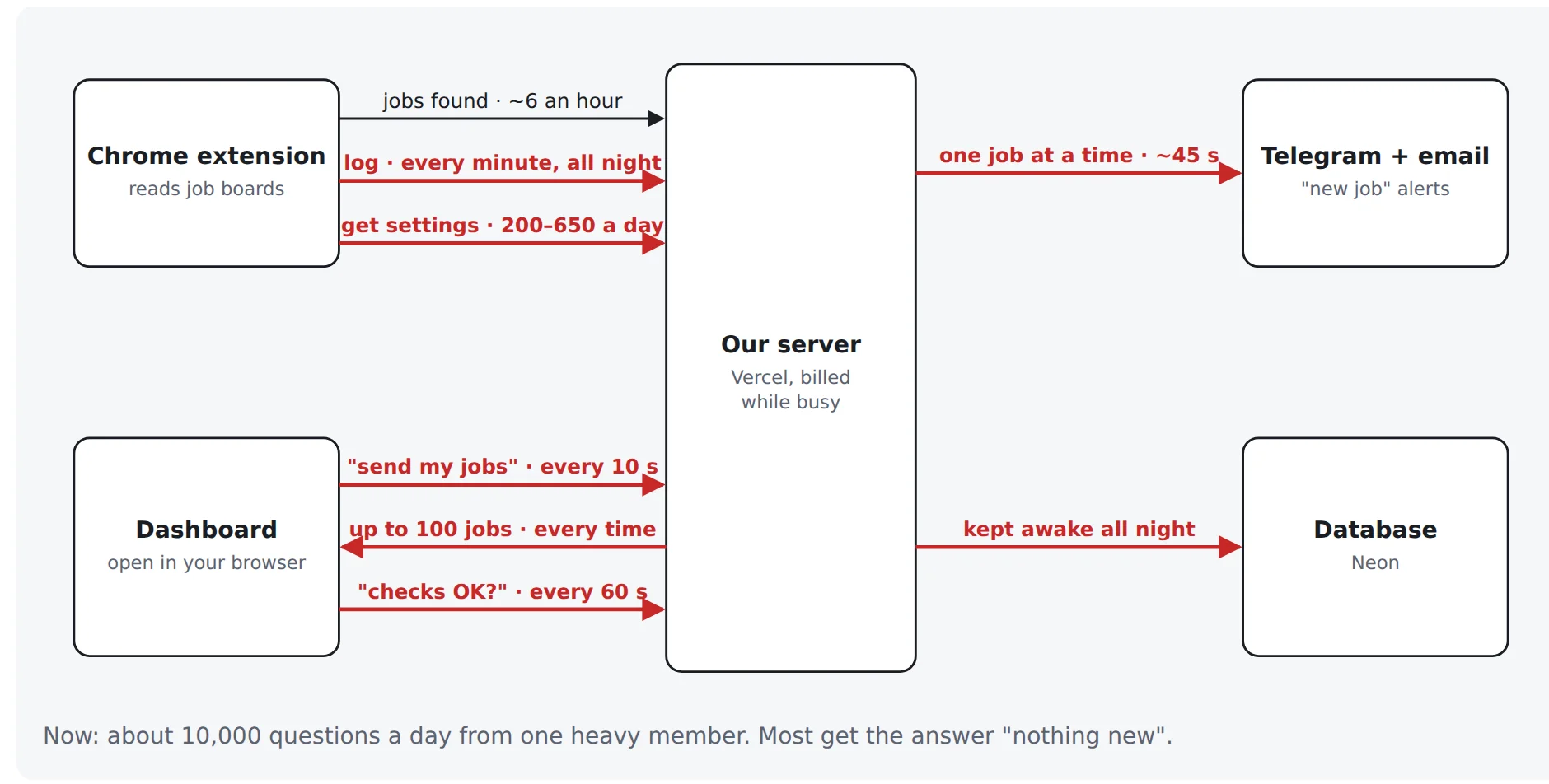
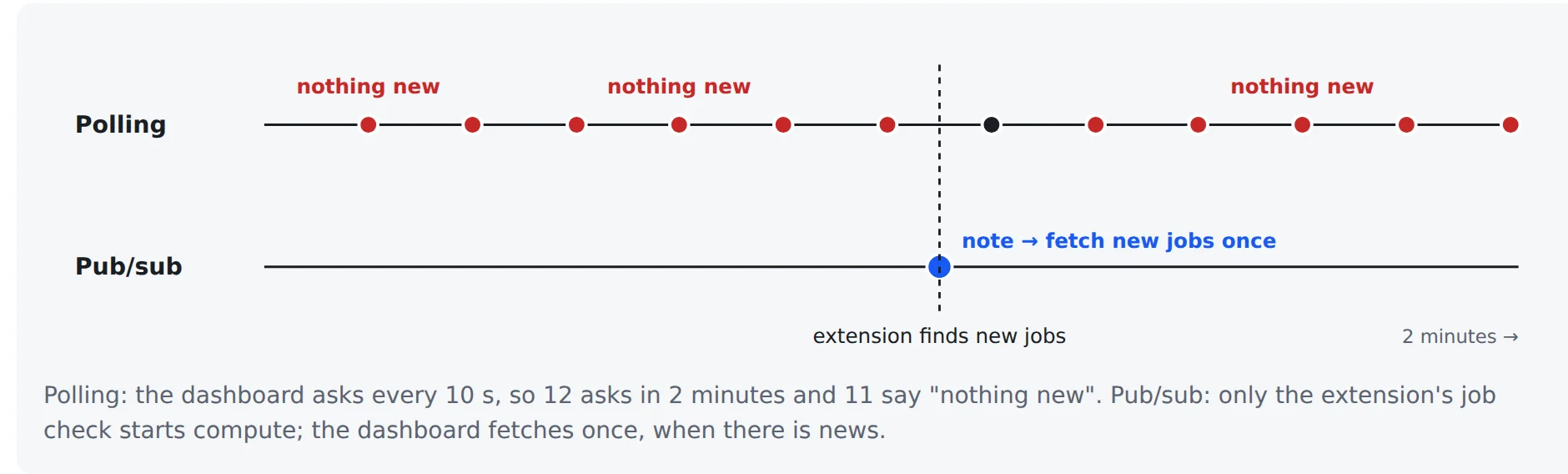
In two minutes that is 12 questions. 11 of them come back empty. For one busy user, I counted about 10,000 requests a day from the code.
The fix: pub/sub
Pub/sub means publish / subscribe. Whoever has news publishes it. Whoever wants it subscribes and gets told.
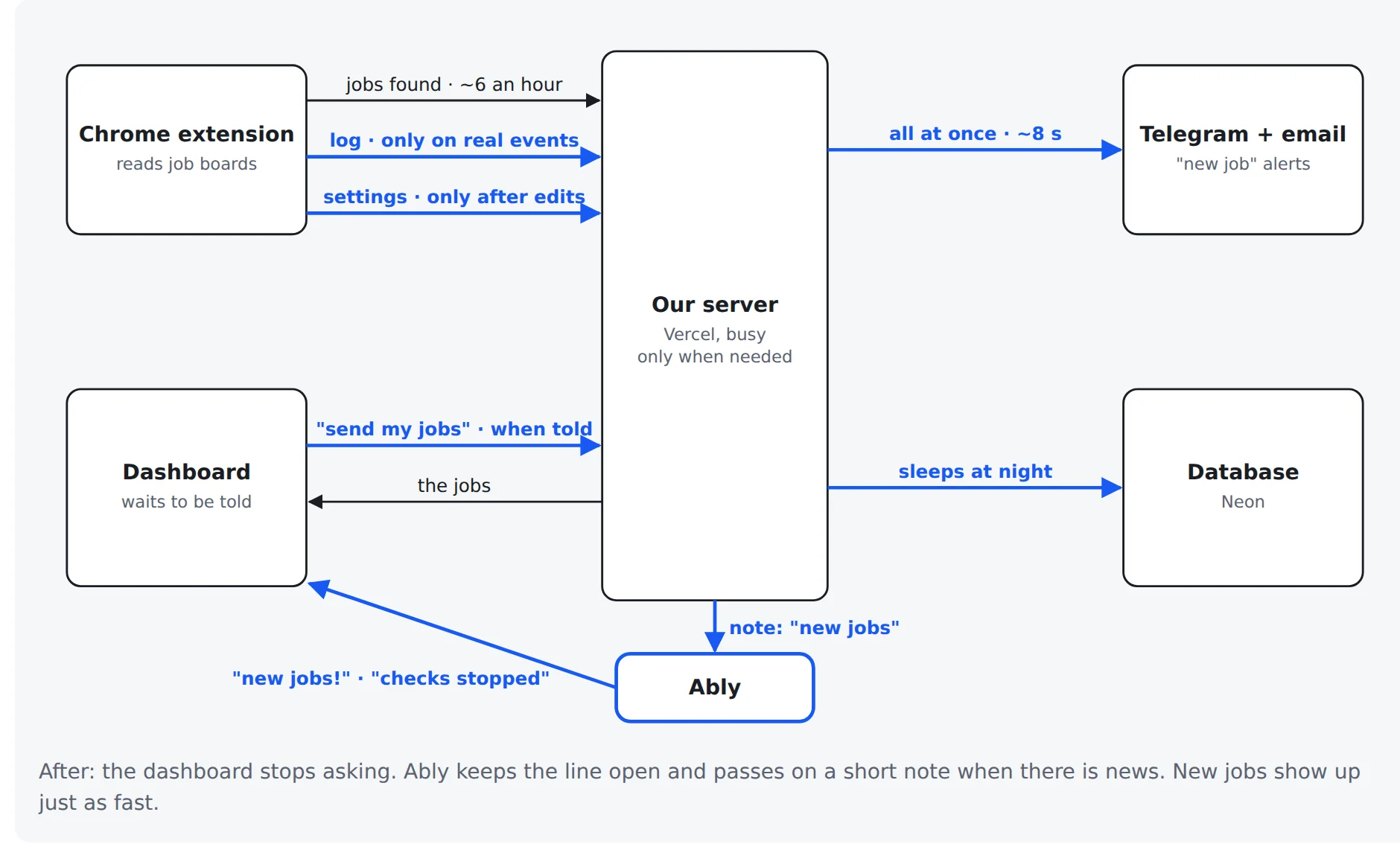
- The dashboard subscribes to its own channel and waits.
- When new jobs are saved, the server publishes one short note: “new jobs”.
- The dashboard gets the note and fetches the new jobs once.
Now only real work starts the server: a job check that finds something. The dashboard costs nothing while it waits.
Why a separate service holds the line
To be told about news, the dashboard needs a connection that stays open all day. A serverless function bills an open connection like a phone call, by the minute.
So a pub/sub service (here: Ably) holds those open connections. Its free plan covers 200 open dashboards; after that it is $29 a month. The server only makes a one-second call to it when there is news.
Who sees what
Each user has their own channel. The server hands each dashboard a pass that opens only that channel. The note says “new jobs” and nothing else. The jobs themselves come from the server, which checks the login. No user can see another user’s data.
Same idea, four more places
The same app had four other “busy for nothing” habits. The fix is the same each time: do work only when something happened.
| Habit | Now | After |
|---|---|---|
| Activity log from the browser extension | every minute, all night | only real events |
| Extension settings | downloaded hundreds of times a day | only after an edit |
| Alerts (email, chat) | sent one at a time | sent together |
| Database | kept awake all night | sleeps when idle |
What it saves
My estimate from the code: hosting for one heavy user drops from about $3–6 a month to about $0.40. Users see no change: same jobs, same alerts, same speed.
These are estimates. I will measure the real numbers on the hosting bill the week before and the week after the change.
Check your own app
You can spot this without reading code. Ask your developer:
- Which screens update by themselves? For each one: does it ask on a timer, or is it told?
- How often does that data really change? If it changes a few times an hour, a 10-second timer is almost all waste.
- Is the hosting billed per request? On serverless hosts, every empty answer is on the bill.
- What happens when the push service is down? The screen should fall back to a slow check, not go blank.
Polling is fine when the data changes every few seconds anyway, when few people keep the screen open, or when the server costs the same whether it is busy or not.
More on what grows your bill as users grow: SaaS scaling readiness checklist.
You don’t need to find these yourself. I read the code, count what each screen asks for and how often, and make the change. Your users see the same app.
The short version
Polling pays the server to say “nothing new” all day. Pub/sub lets the server speak only when there is news.
How does your app’s dashboard stay up to date today?
Stack: Next.js on Vercel (Fluid compute), Postgres on Neon, a Chrome extension (Manifest V3). Pub/sub: Ably.
Before: a 10-second poll
The dashboard hook reloaded everything on a timer while the tab was visible:
const JOB_ALERT_REFRESH_INTERVAL_MS = 10_000;

const interval = window.setInterval(() => {
  if (document.hidden) return; // hidden tab: skip
  void fetchAlerts({ quiet: true }); // GET /api/job-alerts + /diagnostics
}, JOB_ALERT_REFRESH_INTERVAL_MS);
Each tick was two function invocations, and /api/job-alerts returns the searches, settings and up to 100 inbox jobs. A separate alarm polled a status route every 60 s, even when the tab was hidden.
New jobs only appear when the extension posts a check result, a few times an hour. Everything in between was paid-for “no change”.
Now: publish on write, subscribe on read
The write path has one place to hook in: the check-result route runs its follow-up work in after(), once the response is sent.
// app/api/job-alerts/[id]/check-result/route.ts
after(() => afterCheckRecorded(getDb(), scope, user.email ?? null, result));
Simplified from the shipped code:
// server: after new jobs are saved
import Ably from "ably";
const ably = new Ably.Rest(process.env.ABLY_API_KEY!);

await ably.channels.get(`prod:account:${scope.accountId}`).publish("changed", null);
// server: token route, subscribe-only, own channel only
const token = await ably.auth.createTokenRequest({
clientId: accountId,
capability: { [`prod:account:${accountId}`]: ["subscribe"] },
});// client: replace setInterval with a subscription
const realtime = new Ably.Realtime({ authUrl: "/api/realtime/token" });
realtime.channels.get(`prod:account:${accountId}`).subscribe("changed", () => {
void fetchAlerts({ quiet: true });
});Design rules:
- The message carries no data. It is a “something changed” signal. The client refetches through the normal authenticated route, so authorization stays in one place.
- One channel per account, subscribe-only tokens. A leaked token can listen to one account’s “new jobs” pings and nothing else.
- Load once on open. A fresh tab fetches once, then waits for pings.
- Channels are prefixed by site (
prod:/dev:), so a dev copy never pings live tabs. - Keep a slow safety poll. With push on, the tab still refetches every 5 minutes, during the member’s hours only, for state no note covers. No Ably key: it falls back to the 10 s poll.
- A failed publish never throws. It is logged; the tab catches up on its next safety poll.
Why not hold the socket on Vercel?
A Vercel function can stream, but an open connection keeps the instance provisioned for as long as it is open. Ten hours a day per user is ten hours of billed memory. A managed pub/sub service holds the sockets; the function only publishes, in milliseconds.
The other four “busy for nothing” fixes
- Alerts in parallel: per-job Telegram and email sends run one after another inside
after(); switch toPromise.allso the instance finishes in seconds, not ~45 s. - Extension run log: the extension posts a log every minute, even outside hours (~1,440 a day). Post only on a real check or an error.
- Extension settings: fetched on almost every wake. Cache them and refetch on a “settings changed” ping.
- Let Postgres sleep: the per-minute log and a 1-minute watch timer keep Neon compute awake 24/7. Remove both triggers at night and it scales to zero.
Measuring it
Vercel’s Hobby plan shows usage totals only (per-route metrics need Observability Plus). So I read the Usage page for the week before and the week after, and compare invocations, active CPU, provisioned memory and data transfer.
More Posts
All posts
November 25, 2026
Why Your App Went Offline on Vercel's Free Plan (and How to Stay Under the Limits)
Vercel's free plan pauses every site on the account when one monthly limit runs out. What the limits mean in plain words, what uses them up, and the fixes, from a real case.
November 24, 2026
Why Your Project Starts With a Small Paid Step: Requirements and an Estimate Before the Build
A price given before the work is measured is a guess, and someone pays for it later. What a small paid first step gets you: written decisions, a cost range and a time range, and the choice to stop there.